Tuesday, April 13, 2010

Mobile Security Hacks to Avoid

The average cost of a data breach is $6.75 million. While some argue that data breaches cannot be prevented, training and education can prove to be a very effective remedy.

Hacking: The Next Generation is an extremely good book filled with detailed examples on how hackers maliciously attack unsuspecting users. While this book primarily discusses the offensive strategies hackers employ, I am going to discuss several countermeasures to help secure mobile users. Mobile vulnerabilities typically fall under one or more of the following categories:

WIFI Hacks


TJ Maxx suffered a $4.5 billion data breach because they had a WIFI security vulnerability in one of their stores. WIFI networks can be extremely insecure and they provide hackers two attack options.
Passive Attacks
Passive attacks are when hackers utilize tools to scan the WIFI network for streams of personal data. The hacker is hoping an unaware user will enter personal information from a non-secured web site. For example, MySpace still allows users to log in unsecured (non-https). Your user credentials will pass the wire in clear text! The hacker may attempt to retry those same credentials against your email, corporate, and personal banking sites. Social networking sites often expose these personal details. One potential solution is to never re-use your credentials across multiple sites. Better yet, never enter personal information over an insecure network!
Active Attacks
Active attacks are when hackers setup rogue access points on a WIFI network. From this approach, the hacker is hoping an unsuspecting user connects to their malicious access point. If a connection is established and the unsuspecting user ignores the security vulnerability warnings, the hacker has access to all your personal data even over a secured (https) site.

Defending WIFI attacks
  • Never enter personal information from insecure (non-https) sites. Look for either "https" within the browsers URL or look for the locked image icon browser lock within your browser to determine if the site is secure. Browser warnings can also be configured to alert users when they are not on a secured site.

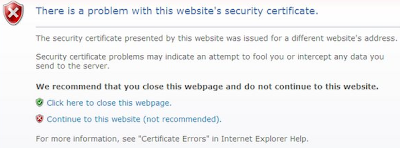
  • Validate you are connected to a trusted WIFI access point. Most browsers can protect and alert users of this attack. For example, from IE you would see a warning shown in Figure 1 below. However, most users may not completely understand the warning and may ignore it completely. For example, if you need to board a plane in 15-minutes and need to send an urgent email what do you do? In IE, the security setting to enable this check is shown in Figure 2 and is enabled by default.


  • Internet Explorer certificate warning
    Figure 1.


    IE certificate security setting
    Figure 2.


  • Validate strong encryption is used on your wireless network. WPA is preferred. For example, if you are still using WEP encryption for your home wireless network you should upgrade. There are tools that allow hackers to crack WEP encryption relatively quickly.

  • Encrypt sensitive documents. Encryption adds an additional layer of security. If you have personal documents saved locally they should be encrypted. Also, when sending sensitive documents those should be encrypted too.

Stolen Phone


The most common type of data breach is from physically stolen devices. Forty percent of data breaches fall under this category. Additionally, hackers may use CSI sticks to extract all data and leave your phone behind. So do not assume that your data has not been tampered with if you still have your phone in hand.

Defending Stolen Phone
  • Encrypt sensitive documents!

  • Remotely erase your phone if it is lost or stolen. For example, Mobile Defense is an Android app that can remotely find, lock, backup, and erase your phone.


Voice Mail Hacking


Can you access your mobile voicemail from your cellphone without entering a PIN? If you can, you may be susceptible to caller ID spoofing. Make sure a PIN is required for all voicemail access. Nitesh Dhanjani has a detailed blog posting about this attack.

Saturday, March 27, 2010

Top 5 Home Screen Features For Android Developers


Android has several very intriguing components that add many dynamic capabilities to your home screen. The trend is slowly migrating towards dynamic home screens. The static screens you have been accustomed to are over. Users want access to information faster and with fewer clicks. Patent filings are a very good barometer for the future direction of mobile operating systems and home screen patents are one of them. Dynamic home screens are definitely a trend. In fact, Android provides many intriguing home screen components that you can leverage right now to create a more efficient and dramatic user experience:

App Widgets

App Widgets are small application components that you can embed on your home screen. If you need instant access to important data, these compact portlet-like components are an ideal choice.
Advantages:
  • Compact design
  • Provides portlet-like capabilities for your home screen
  • Quick and simple to access
  • Refresh frequency is configurable


Quick Search Box

Quick search boxThe Quick Search Box is an extremely powerful feature. It is the ubiquitous Google search function available directly on your Android device. In addition to its Google Web search capabilities, users can also search their local device and applications too. The only caveat with Quick Search is that users must opt-in to search their applications.
Advantages:
  • The only search function your device will ever need
  • Leverages the power of Google Search
  • Displays results in a consistent framework
  • Available directly from your home screen


Live Wallpapers

Live Wallpapers are interactive backgrounds that are available on your home screen. Most of the current Live Wallpaper apps in this space are of the fun and whimsical type. However, if you wanted your calendar, appointments, or stock streamer available here it can be accomplished.
Advantages:
  • Quick and simple to access
  • Refresh frequency can be customized
  • These are simply apps exposed to the background


Live Folders

A Live Folder is a real-time view of data. Live Folders can be launched from your home screen via a shortcut.
Advantages:
  • Quick and simple to access
  • Data is refreshed in real-time


Status Bar Notifications

Status Bar Notifications conveniently alert the user from the home screen. In addition to an icon or text notification you can also be notified via sound, vibration, or flashing lights.
Advantages:
  • Quick and simple to access
  • Alerts can notify users in real-time

Sunday, March 14, 2010

No Fluff Just Stuff: Minneapolis Summary (Spring)

The No Fluff Just Stuff conference was back in Minneapolis. Here is a brief recap of the sessions I attended:

Friday Sessions

Encryption on the JVM: Boot Camp

Key points:
  • Anything can be cracked with time, money, and hardware. The goal is to make it an infeasible task.
  • The Java Cryptography Extention (JCE) within the JDK is a good library. However, JASYPT was the speakers preferred encryption library.
  • Is all of your sensitive information encrypted?

Encryption on the JVM: Advanced Techniques

Key points:

Hadoop: Divide and Conquer Gigantic Datasets (Intro)

Key points:
  • Hadoop is an extremely performant solution for searching enormous amounts (terabytes) of unstructured data (HTML, XML, images). The performance advantage is achieved from partitioning the search across a cluster of worker nodes.


Keynote: How (not why) Agile Works!

Key points:
  • Agile works for the following three reasons:
    1. It provides continuous feedback loops
    2. Improves communication
    3. It is fun!


Saturday Sessions

Grails - How to Build Enterprise Apps

Key points:
  • The GORM capabilities are nice. It is not necessary to code trivial finder methods. For example, Person.findAllByAgeLessThan(16) is implicitly available. The convention works as follows: .findAllBy(). Very convenient.


Implementing Evolutionary Architecture

Key points:
  • Restful Web Services are appealing because they are scalable and free.
  • What is the value of leveraging Hypermedia as the engine of application state (HATEAOS)? This strategy completely decouples the server-side workflow from the client. For example, imagine we have a wizard-style workflow where the user makes decisions and clicks the "next" button as they continue through each step. As the server processes the requests, it will update the state of the workflow and respond with a list of allowable transitions (URI links) that the user may perform next. What is the advantage? If the workflow changes in the future we only have to update the workflow on the server-side. No client-side changes will be necessary because the server is dynamically driving the UI's navigation by returning the allowable URI links following each request.


Implementing Emergent Design

Key points:
  • Code == Design
  • Delay design decisions until the last responsible moment.
  • Eliminating technical debt must be a continuous process. You may evaluate your technical debt with Sonar.
  • Code analysis tools:
    • ckjm (analyze coupling)
    • x-ray (Eclipse plug-in to analyze system complexity)
    • Structure101 (Currently used on the Spring framework)


HTML 5 ... and the Kitchen Sink

Key points:

Sunday Sessions

Architecting Code for Concurrent Execution

Key points:
  • The preferred design strategy is to manage concurrency concerns at an architectural level. Traditionally, we have leveraged concurrency via Java's synchronized keyword at the method level. Successfully managing concurrency at a low level can become challenging. Instead, prefer to leverage architectural design patterns to simplify concurrency management. Several design patterns for consideration include:
  • Functional languages are inherently thread-safe because all their objects are immutable.


Introducing Spring Roo

Key points:
  • Spring Roo can help provide Grails-like scaffolding. A valuable tool for rapid prototyping.

Sunday, February 7, 2010

Android: Ideal Platform for Busy Java Developers


Android is an appealing technology for Java developers. The platform provides many new capabilities and possibilities. In addition, the learning curve is relatively small.


Learning Curve Matrix
ToolSkillsetDescription
NewExisting
Java XAndroid applications are written using the Java programming language. This should be a major advantage for Android because the Java community is extremely strong.

A skillset that deserves more attention when developing mobile applications is performance. Java developers must adhere to coding practices that optimize performance. Mobile development is the only platform where production devices will run much slower than your local development environment. For example, the emulator running on your local PC will have much greater network bandwidth, RAM, and processing power compared to the mobile devices running in production. Although, within Eclipse you can configure the network speed you want your emulator to simulate. This is a valuable feature for simulating the speed of your application across different performing mobile networks.
Android SDKX The Android SDK is the only new skillset that must be acquired for existing Java developers. The Android developer documentation is very informative and the SDK install has sample applications for nearly every SDK feature. In addition to learning the SDK, developers will also need to become familiar with the Android architecture, lifecycle, and mobile design guidelines. Android's developer documentation contains substantial information within each of these areas.
IDE XThe preferred IDE for developing Android applications is with Eclipse and the Android Development Tools (ADT) plugin. Experienced Eclipse developers should have a complete development environment setup in about ten minutes when following the quick start guide. However, other IDE's are supported for Android development too.
Debugger XDebugging Android applications is simple. It is identical to what you have become accustomed to within Eclipse. Simply set your breakpoints and run your application in Debug mode.

The Dalvik Debug Monitor Server (DDMS) is an extremely helpful debug tool that's included within the ADT plugin. It contains features for monitoring threads, CPU usage, memory consumption, and garbage collection. In addition, it allows the developer to mock incoming calls, SMS messages, location controls (GPS positioning), and network speed and latency.
Deploy XRunning your Android application is identical to running a Java application. Within Eclipse, you simply right-click on your project and select Run As -> Android Application.


Again, the ideal advantage Android has for Java developers is the rapid setup and the productivity of leveraging many existing skills. Mobile development requires application developers to think in a slightly new paradigm. Android allows Java developers to focus on this new paradigm exclusively.


Favorite Android Links