Monday, April 20, 2009

Kanban: The Good Parts

Kanban Estimates

Struggling with those developer estimates? If you are, you may want to give Kanban's estimation practice a try. The Kanban methodology almost entirely eliminates the estimation process. Instead of using formal planning and estimation all features have approximately the same size. Hours that were previously burnt estimating are actually spent delivering software. When compared to the Scrum estimation model, this style of estimation is very lean.

Advantages:
  • Hours previously spent estimating are spent delivering software.
  • The focus is on delivering software more rapidly vs focusing on when the software will be delivered.
  • Does not invest heavily in a metric that is not scientific or always accurate.
Disadvantages:
  • High level estimates are still necessary for resource planning.

Kanban Stand ups

Unlike Scrum stand ups where each individual answers the three magical questions of: what did I do yesterday, what am I doing today, and what issues do I have. Kanban focuses exclusively on issues. For example, the global question now becomes: Does anyone have any issues?

Advantages:
  • Quicker stand ups.
  • The stand up scales better for larger teams.
  • Issues are the main focus.
Disadvantages:
  • May lose visibility of what each member is working on.

Resources

Monday, April 6, 2009

Secure Computing: Preventing Cross Site Scripting (XSS)

XSS prevention cheat sheet

The best strategies for preventing Cross Site Scripting can be found in OWASP's XSS prevention cheat sheet. Several important notes include:
  • You MUST use the escape syntax for the part of the HTML document you're putting untrusted data into. There is no single escape function that can be applied for all output contexts (HTML, CSS, JavaScript). ESAPI has an API that provides encoding rules for a particular output context. Refer to the OWASP's prevention rules for more details.
  • It is impossible to secure a JavaScript context with escaping. This is an important note because there is no defense to this scenario except to eliminate the output of dynamic content within your JavaScript context entirely.

XSS and JSTL

JSTL used appropriately will protect you from an XSS attack within your HTML context. For example, this a valid JSTL solution:
<%-- XSS safe --%>
<c:out value="${untrusted_data}" escapeXml="true" />
By default, the excapeXml attribute is "true" within the out tag so you don't have to explicitly declare it.

The JSTL expression language alone will NOT protect you from an XSS attack. For example this is not safe and MUST be avoided for all untrusted data:
<%-- Not XSS safe --%>
${untrusted_data}

XSS input validation

Validating input characters for malicious data should not be your only method of prevention. It is recommended to always escape untrusted data on the output side because you account for all data regardless of where the data originated from. Maybe the data was maliciously altered in the database or perhaps your third-party vendor sent harmful data outside HTTP. Input validation does not account for those scenarios and should not be used as your only defense. Output escaping with ESAPI or JSTL covers all bases regardless of where the data originated from. If you prefer to validate user input for XSS you may use regular expressions. A whitelist strategy of allowing positive characters is preferred. For example, the regular expression code below is a whitelist pattern that only allows certain characters as valid input:
public final class ValidationUtils {

/* Whitelist validation example. Only allow alphanumerics and special characters: -@&., */
public final static Pattern VALID_TEXT_FIELD_PATTERN = Pattern.compile("[A-Za-z0-9-@&\\.,\\s]*");

public static final boolean isValid(Pattern pattern, final String value) {
return pattern.matcher(value).matches();
}

}

XSS and JSON

If you are using JSON on the client-side make sure you also validate your JSON content for malicious data. Douglas Crockford, in his recent book JavaScript: The Good Parts recommends using JSON.parse() for all untrusted content. JSON.parse() will throw an exception if the text contains anything dangerous.

Thursday, March 26, 2009

Identify security gaps with Tamper Data

How secure is your application? Why not perform a security audit yourself. Tamper Data is a very helpful Firefox tool to help identify security gaps your applications may have. Do you really think your hidden form fields are safe? Do you think your select list data can't be altered? Basically, all data exposed to the browser context can be altered by the end user.

Advantages of Tamper Data

  • Tamper data will show you how easy your data can be attacked. Every post parameter can be altered. This includes hidden fields and select list values.
  • Tamper data helps emphasize the data you must secure from a malicious user. Are you exposing any identifier values within the browser context? Look for these primary key values. You may find these in edit or search result screens. If you do expose sensitive keys, a malicious user may alter them as they search for sensitive data.
  • Tamper data makes it very easy for developers to quickly test your application against cross site scripting (XSS) and SQL injection attacks.
  • QA can leverage Tamper Data to identify security gaps also. This is a practice that is not very common. Tamper Data can simplify this effort.


How to setup Tamper Data

  1. From within Firefox, download: Tamper Data.
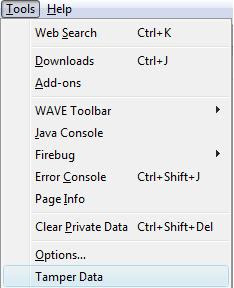
  2. After the download is complete, you may access the Tamper Data screen from either the Tools menu or View menu:

    Accessing tamper data from tools menu Accessing Tamper data from view menu, side bar sub menu
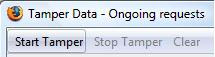
  3. Start Tamper data by clicking the "Start Tamper" button: start tamper button


  4. You can now test your application for any gaps. You may tamper with any post parameter values that appear in the right pane:tamper screen shot

Alright, so what are a few strategies for securing our data? In my next post I will discuss a few defensive programming practices to help secure your sensitive data. I'll also expose a JSTL gap that makes you vulnerable to XSS attacks.

Thursday, March 12, 2009

Prefer CSS-based designs

Are you leveraging the full potential of CSS? Traditionally, tabled-based layouts were the standard for structuring content. CSS provides many advantages that we should be leveraging today. In short, table-based designs should forever be deprecated.

Advantages for adopting CSS-based designs:

  • CSS-based designs render content better in mobile-based browsers. With mobile apps on the rise it is becoming even more important to apply CSS-based designs today on your regular browser applications. Sites designed with CSS layouts offer much better flexibility in regards to how the content is rendered on the UI. For example, given the same content you may apply a different style for your mobile based application vs your non-mobile based application.
  • Your pages will have less code and become much easier to read. No more <table>, <tr>, and <td> tags to clutter your content!
  • With less code to maintain, refactoring becomes simpler.
  • Your UI becomes more accessible.
  • Lightweight pages will be more performant.

CSS Books:

  • CSS Mastery:
    • This book was the most valuable for me. It's a quick read and their examples are very good. I typically reference their examples first when looking for solutions.
  • CSS The missing manual:
    • This is also a valuable book. This book contains much more content than the prior book and may be targeted for a more introductory audience. Their examples are also good but I typically reference the CSS Mastery examples first.

CSS Tools:

  • FireBug:
    • Arguably the best tool ever invented for Web development. Refer to the FireBug site for their CSS support features. Simply awesome for everything (debugging, JavaScript, CSS)! YSlow is also a helpful FireBug addition that provides an excellent performance report card.
  • YUI Grids CSS:
    • If you are looking for a CSS framework then this may be of value. Their base and grid styles should help with layout while their reset style will help get all browser's on an even playing field. Yahoo has a good demo of its features on their YUI Grids home page.