Thursday, March 26, 2009

Identify security gaps with Tamper Data

How secure is your application? Why not perform a security audit yourself. Tamper Data is a very helpful Firefox tool to help identify security gaps your applications may have. Do you really think your hidden form fields are safe? Do you think your select list data can't be altered? Basically, all data exposed to the browser context can be altered by the end user.

Advantages of Tamper Data

  • Tamper data will show you how easy your data can be attacked. Every post parameter can be altered. This includes hidden fields and select list values.
  • Tamper data helps emphasize the data you must secure from a malicious user. Are you exposing any identifier values within the browser context? Look for these primary key values. You may find these in edit or search result screens. If you do expose sensitive keys, a malicious user may alter them as they search for sensitive data.
  • Tamper data makes it very easy for developers to quickly test your application against cross site scripting (XSS) and SQL injection attacks.
  • QA can leverage Tamper Data to identify security gaps also. This is a practice that is not very common. Tamper Data can simplify this effort.


How to setup Tamper Data

  1. From within Firefox, download: Tamper Data.
  2. After the download is complete, you may access the Tamper Data screen from either the Tools menu or View menu:
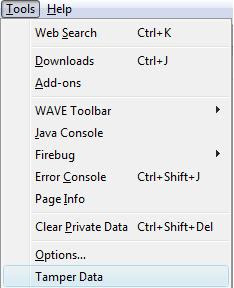
    Accessing tamper data from tools menu Accessing Tamper data from view menu, side bar sub menu
  3. Start Tamper data by clicking the "Start Tamper" button: start tamper button
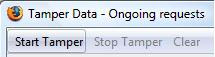

  4. You can now test your application for any gaps. You may tamper with any post parameter values that appear in the right pane:tamper screen shot

Alright, so what are a few strategies for securing our data? In my next post I will discuss a few defensive programming practices to help secure your sensitive data. I'll also expose a JSTL gap that makes you vulnerable to XSS attacks.


Thursday, March 12, 2009

Prefer CSS-based designs

Are you leveraging the full potential of CSS? Traditionally, tabled-based layouts were the standard for structuring content. CSS provides many advantages that we should be leveraging today. In short, table-based designs should forever be deprecated.

Advantages for adopting CSS-based designs:

  • CSS-based designs render content better in mobile-based browsers. With mobile apps on the rise it is becoming even more important to apply CSS-based designs today on your regular browser applications. Sites designed with CSS layouts offer much better flexibility in regards to how the content is rendered on the UI. For example, given the same content you may apply a different style for your mobile based application vs your non-mobile based application.
  • Your pages will have less code and become much easier to read. No more <table>, <tr>, and <td> tags to clutter your content!
  • With less code to maintain, refactoring becomes simpler.
  • Your UI becomes more accessible.
  • Lightweight pages will be more performant.

CSS Books:

  • CSS Mastery:
    • This book was the most valuable for me. It's a quick read and their examples are very good. I typically reference their examples first when looking for solutions.
  • CSS The missing manual:
    • This is also a valuable book. This book contains much more content than the prior book and may be targeted for a more introductory audience. Their examples are also good but I typically reference the CSS Mastery examples first.

CSS Tools:

  • FireBug:
    • Arguably the best tool ever invented for Web development. Refer to the FireBug site for their CSS support features. Simply awesome for everything (debugging, JavaScript, CSS)! YSlow is also a helpful FireBug addition that provides an excellent performance report card.
  • YUI Grids CSS:
    • If you are looking for a CSS framework then this may be of value. Their base and grid styles should help with layout while their reset style will help get all browser's on an even playing field. Yahoo has a good demo of its features on their YUI Grids home page.

Saturday, February 28, 2009

Spring Webflow: An elegant DSL for your MVC

Spring Web Flow is an interesting MVC framework. Under the hood, it is an implementation of a Finite State Machine (FSM). However, the beauty of Spring Web Flow is in the simplified DSL templating that Web Flow provides.

First, lets look at a simple example:
<flow start-state="start">

<view-state id="start" view="chooseColor.jsp">
<transition on="red" to="showRed" />
</view-state>

<end-state id="showRed" view="red.jsp"/>

</flow>

This web flow above has two states and one transition. States in web flow typically correspond to views. In this case, my views are JSP's. Transitions will be triggered based on events. Within a JSP, events correspond to buttons or links. The event or button to trigger the red event is defined here:

<html>
...

<form:form action="${flowExecutionUrl}">
<input type="submit" name="_eventId_red" value="Red" />
</form:form>

...
</html>


The flowExecutionUrl contains the context-relative URL to the current flow execution's view state. Alright, so what advantages does web flow provide? Here are a few:

  • Do your business users create use cases or flow charts? If they do, those documents should map uniformly to web flows. In fact, the business users that build the flow charts should be able to interpret your web flow definitions also. Self documenting code that you can also share with the business is valuable.

  • Spring Web Flow provides an additional scope called flowScope. Most applications suffer from session bloat because many developers put data into session out of convenience and do not always think about its consequence. Web Flow alleviates this problem with their flow scope. For example, flow scope is created when your flow starts. And when your flow ends, all data held within flow scope is cleaned up automatically. Now you are running lean! In the example below we put a list of colors in flowScope:
    <flow start-state="start">

    <view-state id="start" view="chooseColor.jsp">
    <on-render>
    <evaluate
    expression="colorService.findAllColors()" 
    result="flowScope.colors" />
    </on-render>

    <transition on="red" to="showRed" />
    </view-state>

    <end-state id="showRed" view="red.jsp"/>
    </flow>


  • Spring Web Flow also has a built-in expression language. The expression language is a feature that allows you to call your Spring beans conveniently from within your flows. In the example above, we fetched our colors from the ColorService.

  • There is less code to maintain compared to the other MVC frameworks. You do not need controller objects anymore. However, you still need to create model objects for binding form data to objects. The form binding in web flow is automatic for simple types.

  • Your flows and transitions can be secured with Spring Security. The example below shows how you may secure your web flow or a transition:
    <flow start-state="start">
    <!-- secure the entire flow -->
    <secured attributes="ROLE_USER" />

    <view-state id="start" view="chooseColor.jsp">
    <transition on="red" to="showRed">
    <!-- secure this transition -->
    <secured attributes="ROLE_ADMIN"/>
    </transition>
    </view-state>

    <end-state id="showRed" view="red.jsp"/>

    </flow>


  • You can achieve reuse with subflows and global transitions.
    <flow start-state="start">

    <view-state id="start" view="chooseColor.jsp">
    <transition on="red" to="showRedSubflow" />
    <transition on="green" to="showGreenSubflow" />
    </view-state>

    <!-- subflow states -->
    <subflow-state id="showRedSubflow"
    subflow="redSubflow.jsp" />
    <subflow-state id="showGreenSubflow"
    subflow="greenSubflow.jsp" />

    <end-state id="thankYou" view="thanks.jsp" />

    <!-- If every page had a cancel button we may declare that transition once. -->
    <global-transitions>
    <transition on="cancel" to="cancel.jsp" />
    </global-transitions>

    </flow>


  • Web flows are browser button friendly. To achieve this, every view state rendered gets stored as a snapshot. When you press the back button, the previous snapshot is retrieved from the snapshot repository. For performance, you may limit the number of snapshots that exist within the snapshot repository.

  • Web flows eliminate the double-submit problem. To accomplish this, Spring will apply the POST-REDIRECT-GET pattern to all POST requests. You may also disable this feature if it's not needed or if you want better performance.

  • As always, Spring has strong JUnit test support to help test your flows.


In conclusion, Spring Web Flow is a very unique MVC framework. It is an ideal solution for simplifying complex work flows. I particularly like the simplicity of the domain specific templating language (DSL), the flowScope, and the expression language capabilities.

Thursday, February 19, 2009

Designing for Accessibility

How accessible is your website? If you are interested in finding out, you may enter your URL at the WAVE website for a quick evaluation. You may also download the WAVE Firefox plug-in for even greater control.

Well, did your site have any errors? Technically, you do not have anything to worry about unless your site is for a government agency. In any case, Web standards are a good thing to design for and this WAVE plug-in can be a great tool to help find any gaps you may have. In addition, this tool can also serve as another check list item for your next client-side code review.

If you are interested in designing for accessibility, the effort is minimal. For example, you can achieve nearly zero accessibility errors by simply focusing on these three categories:
  1. Create accessible forms
  2. Create accessible images with appropriate alt text
  3. Use appropriate heading and table header tags

You may be wondering about dynamic content. If you have dynamically updated content, you will also want to learn about ARIA (Accessibility of Rich Internet Applications). For example, if you have data that gets dynamically updated within a <div> tag you can include aria attributes to notify assistive technologies of dynamic content updates. Here are several examples that demonstrate how to make your dynamic content accessible. There is nothing to install to take advantage of ARIA. ARIA is supported in Firefox 3+ and IE 8+.

In conclusion, the effort involved to implement these accessibility standards is relatively minor. In return, you are designing towards standards, your site is consumable by a larger user base, and you have just given your sales team another competitive advantage. The WAVE plug-in also gives you and your QA team an automated tool to evaluate pages for accessibility compliance.