Wednesday, June 16, 2010

NoSQL

NoSQLWhat is the one language that has not changed since you learned it in college? SQL is definitely one of them. In fact, SQL has only received minor updates over the past decade. For DBA's, this has been a luxury. Is NoSQL positioned to change this stability? NoSQL does not change SQL or relational databases, it simply provides a non-relational repository alternative. The last Twin Cities Java User Group presentation given by Perry Hoekstra provided a very good summary of NoSQL's advantages and disadvantages. Here is a recap:

Advantages

  • Performance metrics have shown significant improvements vs relational access. For example, this performance metric compares MySQL vs Cassandra:

  • NoSQL performance metric

  • Inexpensive. All NoSQL implementations except for Amazon's Dynamo are open source.
  • Data types are dynamic (typically strings). However, each implementation defines their own data types.
  • Scales very well.


Disadvantages

  • Bleeding Edge (right now).
  • Replication across a cluster is not guaranteed in real-time. Synchronization will happen. However, the "when" is currently documented as unknown.
  • Third-party report tool (Business Objects, Cognos, etc.) integration is currently not available.
  • Data redundancy is likely to occur without relational tables.
  • The application code performs the SQL-like operations.
  • ORM capabilities do not exist yet.
  • Transaction capabilites do not exist yet. However, Cassandra will have this feature soon.
  • No GUI editor tool support.


Early Adopters of NoSQL

Social media corporations are the primary trailblazers of NoSQL implementations. The list includes:


Resources

Sunday, May 23, 2010

MinneBar 2010 Recap

Minnebar is an (un)conference aimed at getting those in Minnesota’s tech and design communities together to discuss topics that interest them. This (un)conference is unique for several reasons. 1) It's free. However, donations are welcome. For $10 this was the cheapest tech conference I have ever attended. 2) Admission included: breakfast, lunch, snacks, open bar, and of course 8 concurrent session to choose from!

Schedule


Google Page Speed

Key points:
  • Google Page Speed is similar to YSlow. It evaluates the performance of your website, displays the metrics, and lists optimization strategies to improve your score. It can be downloaded as a Firefox plug-in.


Room and Bored

Key points:
  • Is college broken when it comes to Information Technology? This was the topic that was discussed. Personally, I do not see anything broken with college. However, it is very important to supplement real world experience with an IT degree. For example, if you are in High School and want to pursue a career in IT then join your local IT community. It's never too soon. In addition, try finding part-time IT jobs or work for free. There is no substitute for real world experience in addition to an awesome college degree.


"I'm a guru not a God!" A Tao of System Architecture

Key points:
  • Characteristics of successful software systems were discussed. Many common themes were discussed: KISS, don't reinvent the wheel, open/closed principle, etc. In addition to those common traits the one characteristic that topped the list pertained to bureaucracy. Mark Beckman noted that "bureaucracy is evil and should be severely limited".
  • "Bureaucracy frustrates people, distorts their priorities, limits their dreams and turns the face of the entire enterprise inward." -- Jack Welch, GE Annual Report, 2000
  • Lean processes are preferred. We must eliminate the overhead of simple tasks. How quickly can you deploy to production or setup a new development environment? Is the process simple or not? Cloud computing has few hurdles and provides an alternative for departments seeking simpler process.


Mapping Your World with OpenStreetMap

Key points:
  • OpenStreetMap is a Wikipedia of maps allowing anyone to edit the map. Now we can map our favorite tennis courts, hiking trails, or archery range!
  • Topo maps are currently in development.
  • Cloudmade can be used for driving directions


Why Drupal? An expert panel

Key points:

Getting started with CSS3

Key points:

Overall, Minnebar was a hit! The attendance was extremely high with roughly 800-900 attendees. The venue at Best Buy was fantastic. However, next time they should increase the number of available WIFI hotspots. The network was overloaded. I can't wait for the fall show!

Tuesday, April 13, 2010

Mobile Security Hacks to Avoid

The average cost of a data breach is $6.75 million. While some argue that data breaches cannot be prevented, training and education can prove to be a very effective remedy.

Hacking: The Next Generation is an extremely good book filled with detailed examples on how hackers maliciously attack unsuspecting users. While this book primarily discusses the offensive strategies hackers employ, I am going to discuss several countermeasures to help secure mobile users. Mobile vulnerabilities typically fall under one or more of the following categories:

WIFI Hacks


TJ Maxx suffered a $4.5 billion data breach because they had a WIFI security vulnerability in one of their stores. WIFI networks can be extremely insecure and they provide hackers two attack options.
Passive Attacks
Passive attacks are when hackers utilize tools to scan the WIFI network for streams of personal data. The hacker is hoping an unaware user will enter personal information from a non-secured web site. For example, MySpace still allows users to log in unsecured (non-https). Your user credentials will pass the wire in clear text! The hacker may attempt to retry those same credentials against your email, corporate, and personal banking sites. Social networking sites often expose these personal details. One potential solution is to never re-use your credentials across multiple sites. Better yet, never enter personal information over an insecure network!
Active Attacks
Active attacks are when hackers setup rogue access points on a WIFI network. From this approach, the hacker is hoping an unsuspecting user connects to their malicious access point. If a connection is established and the unsuspecting user ignores the security vulnerability warnings, the hacker has access to all your personal data even over a secured (https) site.

Defending WIFI attacks
  • Never enter personal information from insecure (non-https) sites. Look for either "https" within the browsers URL or look for the locked image icon browser lock within your browser to determine if the site is secure. Browser warnings can also be configured to alert users when they are not on a secured site.

  • Validate you are connected to a trusted WIFI access point. Most browsers can protect and alert users of this attack. For example, from IE you would see a warning shown in Figure 1 below. However, most users may not completely understand the warning and may ignore it completely. For example, if you need to board a plane in 15-minutes and need to send an urgent email what do you do? In IE, the security setting to enable this check is shown in Figure 2 and is enabled by default.
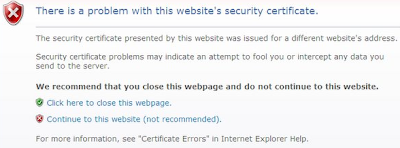

  • Internet Explorer certificate warning
    Figure 1.


    IE certificate security setting
    Figure 2.


  • Validate strong encryption is used on your wireless network. WPA is preferred. For example, if you are still using WEP encryption for your home wireless network you should upgrade. There are tools that allow hackers to crack WEP encryption relatively quickly.

  • Encrypt sensitive documents. Encryption adds an additional layer of security. If you have personal documents saved locally they should be encrypted. Also, when sending sensitive documents those should be encrypted too.


Stolen Phone


The most common type of data breach is from physically stolen devices. Forty percent of data breaches fall under this category. Additionally, hackers may use CSI sticks to extract all data and leave your phone behind. So do not assume that your data has not been tampered with if you still have your phone in hand.

Defending Stolen Phone
  • Encrypt sensitive documents!

  • Remotely erase your phone if it is lost or stolen. For example, Mobile Defense is an Android app that can remotely find, lock, backup, and erase your phone.


Voice Mail Hacking


Can you access your mobile voicemail from your cellphone without entering a PIN? If you can, you may be susceptible to caller ID spoofing. Make sure a PIN is required for all voicemail access. Nitesh Dhanjani has a detailed blog posting about this attack.

Saturday, March 27, 2010

Top 5 Home Screen Features For Android Developers


Android has several very intriguing components that add many dynamic capabilities to your home screen. The trend is slowly migrating towards dynamic home screens. The static screens you have been accustomed to are over. Users want access to information faster and with fewer clicks. Patent filings are a very good barometer for the future direction of mobile operating systems and home screen patents are one of them. Dynamic home screens are definitely a trend. In fact, Android provides many intriguing home screen components that you can leverage right now to create a more efficient and dramatic user experience:

App Widgets

App Widgets are small application components that you can embed on your home screen. If you need instant access to important data, these compact portlet-like components are an ideal choice.
Advantages:
  • Compact design
  • Provides portlet-like capabilities for your home screen
  • Quick and simple to access
  • Refresh frequency is configurable


Quick Search Box

Quick search boxThe Quick Search Box is an extremely powerful feature. It is the ubiquitous Google search function available directly on your Android device. In addition to its Google Web search capabilities, users can also search their local device and applications too. The only caveat with Quick Search is that users must opt-in to search their applications.
Advantages:
  • The only search function your device will ever need
  • Leverages the power of Google Search
  • Displays results in a consistent framework
  • Available directly from your home screen


Live Wallpapers

Live Wallpapers are interactive backgrounds that are available on your home screen. Most of the current Live Wallpaper apps in this space are of the fun and whimsical type. However, if you wanted your calendar, appointments, or stock streamer available here it can be accomplished.
Advantages:
  • Quick and simple to access
  • Refresh frequency can be customized
  • These are simply apps exposed to the background


Live Folders

A Live Folder is a real-time view of data. Live Folders can be launched from your home screen via a shortcut.
Advantages:
  • Quick and simple to access
  • Data is refreshed in real-time


Status Bar Notifications

Status Bar Notifications conveniently alert the user from the home screen. In addition to an icon or text notification you can also be notified via sound, vibration, or flashing lights.
Advantages:
  • Quick and simple to access
  • Alerts can notify users in real-time